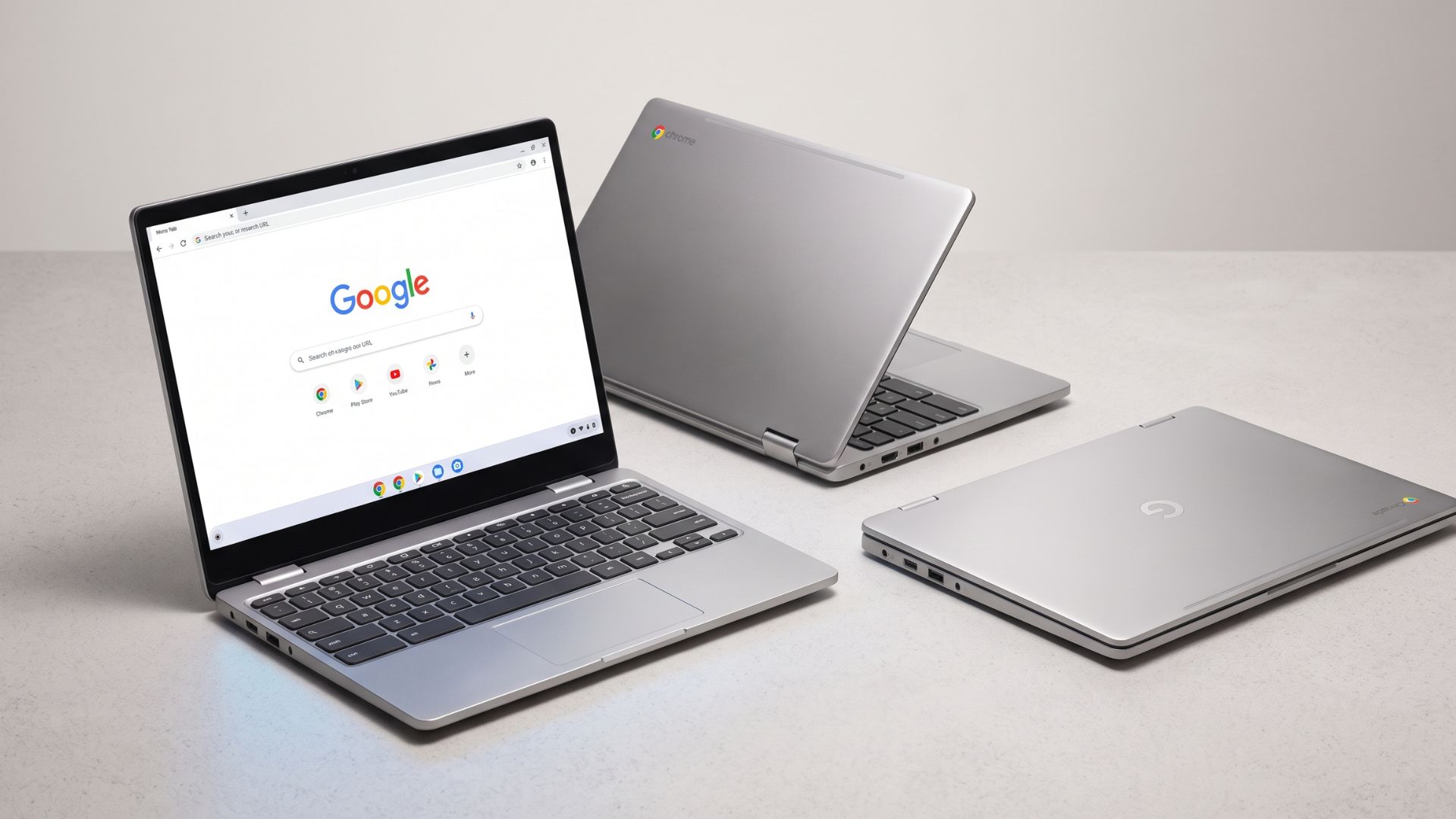
Google has officially launched Googlebook, a new category of premium laptops that aims to redefine personal computing by placing artificial intelligence and deep Android integration at its core. Announced on May 12, 2026, and made available in the US on October 4, 2026, with other regions following on October 5, 2026, Googlebook is not a single device from Google, but rather a software platform powering hardware from partners including Acer, ASUS, Dell, HP, and Lenovo.
Google describes the Googlebook OS as a platform built on the Android technology stack, incorporating desktop foundations developed through ChromeOS. This hybrid approach seeks to merge the extensive app ecosystem of Google Play with a modern operating system designed for intelligence, alongside ChromeOS's robust Chrome browser and Linux development tools. The overarching vision is to transition from a traditional "operating system to an intelligence system," with Gemini AI, referred to as "Gemini Intelligence," deeply embedded into the user experience, often within standard desktop workflows rather than as a separate application.
Among Googlebook's standout features is Magic Pointer, an AI-powered tool that integrates Gemini's assistance directly with the cursor. Users can activate Gemini by wiggling their cursor, prompting contextual suggestions based on on-screen content. This allows for actions like setting up meetings from an email date, visualizing selected images, or merging spreadsheet columns. Google states that Magic Pointer processes screen content locally to identify interactive elements, only sending selected content to a cloud model when a user explicitly requests Gemini to act upon it.
Seamless Android phone integration is another major selling point. Features like Cast My Apps allow users to open and interact with phone applications directly on their Googlebook. Continue On enables the seamless transfer of Android device settings, saved passwords, Wi-Fi networks, and messages during initial setup, and facilitates continuing tasks started on the phone. Quick Access provides direct access to files and photos from a connected Android phone without manual transfers. However, these advanced phone-to-laptop features, including synced notifications, require an Android phone running Android 17 or later, which could limit immediate adoption given Android 17's nascent rollout. Additionally, DRM-protected video services and sensitive applications like banking apps cannot be streamed to the laptop, instead displaying a privacy screen. Early reports also indicate that Samsung phones, even with Android 17, are not yet compatible with these integration features.
AI-powered productivity tools further enhance the Googlebook experience. Rambler is a voice dictation tool designed to refine spoken notes into clear, professional text. Create My Widget allows users to build custom widgets by simply describing their desired functionality, without requiring coding. Users can also prompt Gemini to organize apps into personalized dashboards. For developers, Googlebook includes an isolated Linux environment, leveraging a security-certified pKVM hypervisor, which enables the execution of Linux tools and autonomous agents separately from other system components, providing a full Linux terminal environment for agentic coding.
Hardware specifications for Googlebook models include premium materials such as aluminum, magnesium alloy, and carbon fiber. Devices feature responsive touchscreens, with some offering up to 2.8K OLED displays, haptic glass trackpads, and backlit keyboards. A distinctive "glowbar" serves both aesthetic and functional purposes, indicating battery life and charging status. All models incorporate a dedicated G key for one-touch access to Gemini searches. The initial lineup is powered by either Intel Core Ultra or Qualcomm Snapdragon X Elite processors, each paired with dedicated Neural Processing Units (NPUs) capable of over 45 TOPS for AI workloads. All launch models come with a minimum of 16GB of RAM and 512GB of storage, with some configurations extending to 32GB RAM.
Early performance benchmarks present a varied picture. Snapdragon X Elite systems generally show stronger results in Geekbench 6 multi-core tests and 3DMark graphics, while Intel Core Ultra 5 325 systems tend to lead in CrossMark productivity and responsiveness. One reviewer noted that Snapdragon X Elite models demonstrated approximately 50% better overall performance in multi-core tests compared to Intel Core Ultra 5 325. Another comparison found Snapdragon X Elite outperforming Intel's Core Ultra 5 325 by about 7% in single-core and 20% in multi-core on Geekbench 7, and by roughly 70% in 3DMark Wildlife Extreme graphics. However, real-world performance differences were not always distinctly noticeable in initial testing.
Battery life claims from Google suggest up to 14 hours for video playback or 16 hours for browsing, with some models like the HP Googlebook 14 claiming up to 19 hours for video playback. Independent battery tests, however, have yielded significantly lower results. Tom's Guide reported that tested Googlebooks did not approach the advertised figures, with the Asus Googlebook 14 barely reaching 6.5 hours, and the HP Googlebook 14 achieving nearly 12 hours. Reviewers attribute these discrepancies to more demanding test conditions than Google's internal protocols, which use specific settings like 100 nits brightness and dark theme. The prevalence of OLED panels in most tested Googlebooks, known for higher power consumption, and default 120Hz refresh rates, may also contribute to faster battery drain.
App compatibility is a critical aspect of Googlebook's Android-centric design. The platform runs Android apps from the Google Play Store, a desktop-class Chrome browser with extensions, and a full Linux environment. Google encourages developers to create "adaptive" apps that adjust to various screen sizes and support keyboard, mouse, and multi-window multitasking. While Google asserts that most Android apps run smoothly on both Intel and Snapdragon processors, some demanding apps and games may require developer optimization for x86 Intel-powered Googlebooks. The Play Store highlights optimized apps, though unoptimized ones can still be downloaded. One reviewer expressed frustration with the inability to select text in mobile-style apps and noted that the Chrome browser on Googlebook lacks some recent features found on Windows and Mac, such as the Gemini sidebar, vertical browsing, and split-screen tabs.
In terms of privacy and security, Googlebook builds upon ChromeOS's foundations, incorporating hardware-backed protection. It features Google's Titan security hardware, such as the Titan C2 module in the Lenovo Googlebook, along with defense-in-depth protections and on-device malware detection. The isolated Linux environment operates within a security-certified pKVM hypervisor. Security features also include fingerprint and face unlock. For AI functionalities like Magic Pointer, Google clarifies that screen recognition remains local until a user explicitly requests Gemini to act on selected content, at which point the content is transmitted to a cloud model. Google also advises businesses to exercise caution when sharing sensitive information with AI tools, noting that Gemini's data handling policies can vary between personal and qualifying work/school Google Accounts.
Comparing Googlebook to its competitors reveals distinct positioning. Against Apple MacBooks, Googlebook starts at $899, undercutting the MacBook Air ($999) and MacBook Neo ($699), though the Neo offers a lower entry point. MacBooks are generally preferred for their established native professional creative tools, while Googlebook caters to users deeply invested in Google Workspace, Chrome, and Android apps. While Googlebook offers strong performance, particularly with Snapdragon X Elite chips, MacBooks with Apple Silicon are renowned for their efficiency and performance, with one benchmark even showing the MacBook Air M5 as superior for gaming compared to Googlebooks. MacBook Air M4 models are reported to achieve 16-18 hours of real-world battery life, generally surpassing initial independent tests for Googlebook. Googlebook's deep integration with Android phones mirrors Apple's Continuity features, but its value proposition aims to beat MacBooks on price and AI features, while MacBooks typically retain higher resale value.
Compared to Windows laptops, Googlebook's app ecosystem, centered on Android, is still maturing against Windows' vast and established desktop application base. Both platforms offer diverse hardware from multiple manufacturers. However, Googlebook distinguishes itself with its "Gemini Intelligence" design, aiming for a more pervasive and deeply integrated AI experience from the ground up, whereas Windows is also integrating AI but from an existing desktop foundation.
Googlebook is positioned as the successor to the traditional Chromebook, representing a "much bigger bet" on AI and Android. Its premium pricing, starting at $899, is significantly higher than many traditional Chromebooks. The Googlebook OS, built on the Android technology stack with ChromeOS desktop foundations, offers a more versatile operating system capable of running conventional Android apps natively, unlike Chromebooks which primarily rely on ChromeOS and web apps, with Android app support often layered on top. Googlebook OS promises regular feature drops and updates for up to 10 years, a longer support window than many older Chromebooks. It also aims to address historical Chromebook limitations with offline apps and school testing software through its more robust app ecosystem.
Whether Gemini AI provides real value or is primarily a marketing gimmick is a central question. Branded as "Gemini Intelligence," its integration directly into desktop workflows via features like Magic Pointer, Rambler, and Create My Widget demonstrates Google's intent to offer proactive, contextual assistance. The contextual understanding of Magic Pointer for tasks like scheduling or data merging could genuinely streamline workflows. Rambler and Create My Widget offer tangible benefits for organization and personalization. The isolated Linux environment with full terminal access also provides real utility for developers. However, Google itself states that "Generative AI is experimental," indicating an evolving technology. Cloud reliance for certain AI actions raises privacy concerns, and Google reminds users that Gemini can make mistakes, necessitating verification of AI-generated responses. The pervasive "AI Everywhere" push could also be perceived as a marketing trend if features do not consistently deliver practical, reliable value. The true impact of Gemini AI will depend on its consistent real-world performance and how Google addresses its experimental limitations and privacy considerations.
Googlebook models start at $899 in the US. Specific pricing includes the Acer Googlebook 14 at $899 (noted as a limited-time price), the XPS Googlebook (Dell) at $999, the Lenovo Googlebook 15 at $1,099 (adjusted from an original $1,300), the ASUS Googlebook 14 at $1,299, and the HP Googlebook 14 at $1,299 (adjusted to $1,199). These are starting MSRPs, with actual retail prices and configurations varying. Every Googlebook purchase includes 12 months of Google AI Pro (5TB cloud storage, higher Gemini usage limits) and 3 months of YouTube Premium, Adobe Photoshop, and more. Googlebooks launched on October 4, 2026, in the US, and October 5, 2026, in Canada, the UK, Ireland, France, Germany, and Australia, with pre-orders beginning on September 21, 2026.
Several limitations bear consideration. Many key cross-device features, including Cast My Apps and Continue On, require an Android phone running Android 17 or later. While most Android apps are expected to run, some complex apps and games may require developer optimization for Intel-powered Googlebooks. Early reviews indicate some Android apps may not be fully optimized for a desktop experience, with issues like inability to select text in mobile-style apps. Independent tests show real-world battery life often falls short of Google's advertised claims. DRM-protected video services and sensitive apps cannot be streamed. As of early October 2026, Samsung phones, even with Android 17, reportedly do not work with Googlebook's phone integration features, with no timeline for a fix.
Googlebook is best suited for dedicated Android users, particularly those with an Android 17-compatible phone, who seek a deeply integrated laptop experience with their mobile ecosystem. It is also a strong contender for Google Workspace power users and Android developers who can leverage the Linux environment and adaptive development tools. Users interested in experimenting with Gemini's integrated AI features may also find value. However, professional creators or developers requiring established native desktop applications, iPhone users, those prioritizing consistent all-day battery life, or budget-conscious buyers may find Googlebook less suitable. Users needing flawless app compatibility should verify performance for specific apps before purchase.
The Googlebook represents an ambitious effort by Google to redefine the laptop experience around AI and the Android ecosystem. For the right user, it offers a genuinely innovative approach to integrating AI into daily workflows through features like Magic Pointer, and its deep synergy with Android phones is a significant advantage for those fully embedded in Google's mobile ecosystem. The premium hardware, OLED displays, and long-term OS updates for up to 10 years also add to its appeal. However, potential buyers must weigh these benefits against current limitations, particularly the Android 17 requirement for full phone integration, the nascent state of desktop-optimized Android apps, and the inconsistent battery life reported in early independent tests.
Googlebook is best suited for dedicated Android users, especially those with Android 17 phones, who desire a seamless, integrated experience between their phone and laptop. It is also a strong contender for Google Workspace power users and Android developers who can leverage the Linux environment and adaptive development tools. Students and everyday users who primarily rely on web browsing and Google's suite of apps may also find value, provided they understand the current app compatibility nuances. While Googlebook directly targets the premium laptop market, undercutting the MacBook Air on price while offering touchscreens and AI features, MacBooks still hold a significant advantage in established professional creative software ecosystems, consistent battery life, and a generally more mature desktop operating system. Googlebook's success against the MacBook will depend on how quickly its Android app ecosystem matures for desktop use, how effectively Google addresses performance and battery life inconsistencies, and whether its AI features prove to be indispensable rather than merely novel. For now, it is a distinct alternative rather than a direct replacement, carving out its own niche rather than dethroning Apple's laptops.